2007 is the year we first experienced the infinite scroll wheel. It was known as hyper-scrolling when it was introduced with the Logitech MX Revolution, or to be more exact, MicroGear™ Precision Scroll Wheel. Fast forward to now, and it’s still being incorporated into the popular Logitech MX series, such as the Logitech MX Master 3.
My first experience with these free-spinning wheels was with the Logitech MX Anywhere 3s. Apparently, there are two types of infinite wheel architectures. One uses a mechanical encoder while the other incorporates an electromagnetic scrolling mechanism. MX Anywhere uses the electromagnetic system known as MagSpeed, which provides a button to switch between ratchet mode for line-by-line scrolling or free-spin mode that can scroll countless lines per second. Logitech filed a few patents that are related to its MagSpeed technology, namely,
- US10726984B2 — Electromagnetic mode change of peripheral interface wheel. This covers electromagnetic switching for scroll modes.
- US20070188453A1 — Input device roller with hybrid magnetic ratchet system. This is the early foundational patent for magnetic/electromagnetic ratchet in scroll wheels.
- US12032760B2 — Motorized scroll wheel for an input device. Electromagnetic scroll wheel control using electro-permanent magnets and ferromagnetic rotor
- US12260031B1 — Hubless scroll wheel.
- US11822739B2 — Adaptive scroll wheel. This covers dynamic mode adaptation based on scroll speed/intent.
I still remember what a friend once told me, “Technology is not perfect because humans are not perfect.” With that in mind, there are some deficiencies in this infinite scrolling mechanism that may not suit every user. I also struggle at times when using the Anywhere 3, and here are some areas that others and I find not appealing.
It’s Heavy and There’s a Reason Why
On average, mice with infinite scroll wheels are heavier than other mice, and sometimes, they are more than double the weight of an equivalent mouse. Take the Logitech MX Master 3, which has a whopping 141 grams in weight. In terms of an apple-to-apple comparison, the lightest mouse with a MagSpeed scroll wheel is probably the Logitech MX Anywhere 3s, which is around 100 grams. A close compact mouse competitor is the Dell Pro Compact Silent Mouse MS355, which is only 89 grams with an AA battery. The MX Anywhere probably got away with being lighter because it uses an internal lithium-ion battery, which is 30 to 50% lighter than a conventional AA battery – the battery that MS355 uses.
One of the largest weight contributors is the metal scroll wheel alone. You see, the infinite scroll wheel depends on inertia to free spin. It needs to have enough mass to go the distance, and a lighter wheel would not let it travel freely for too long.
However, one may argue that the higher mass offers more stability and precision when navigating, which brings us to the next point.
It’s Hard to Control
Inherently, the free-spinning behavior does introduce a problem – it’s hard to precisely control where to stop. That is the very reason why we have clicks when we scroll our mouse. That ratcheted feeling gives us more control over how we pinpoint where our cursor falls on the screen.
One of our early test users who enjoys infinite scrolling uses a combination of the caps lock key bound with the R and V keys to create a more precise scrolling behavior.
It’s Easy to Scroll Down But Hard to Scroll Up
One human kinesiology issue a user will encounter when using the free-spinning scroll wheel is that it is hard to scroll up, compared to scrolling down. Our hand and finger muscles are more adapted to grabbing or catching something. This natural behavior empowers our finger to flick down, which uses the same muscles, joints and tendons.
Technically, it’s easier to flex the fingers inward than to extend them outward. Thus, flicking upward to scroll up (or scroll down if your mouse is set to the natural scrolling setting) takes more human effort. This somewhat makes the infinite scroll wheel inefficient when you need to browse content way above the screen.
You Need to Press a Button to Engage The Free-Spinning Mode
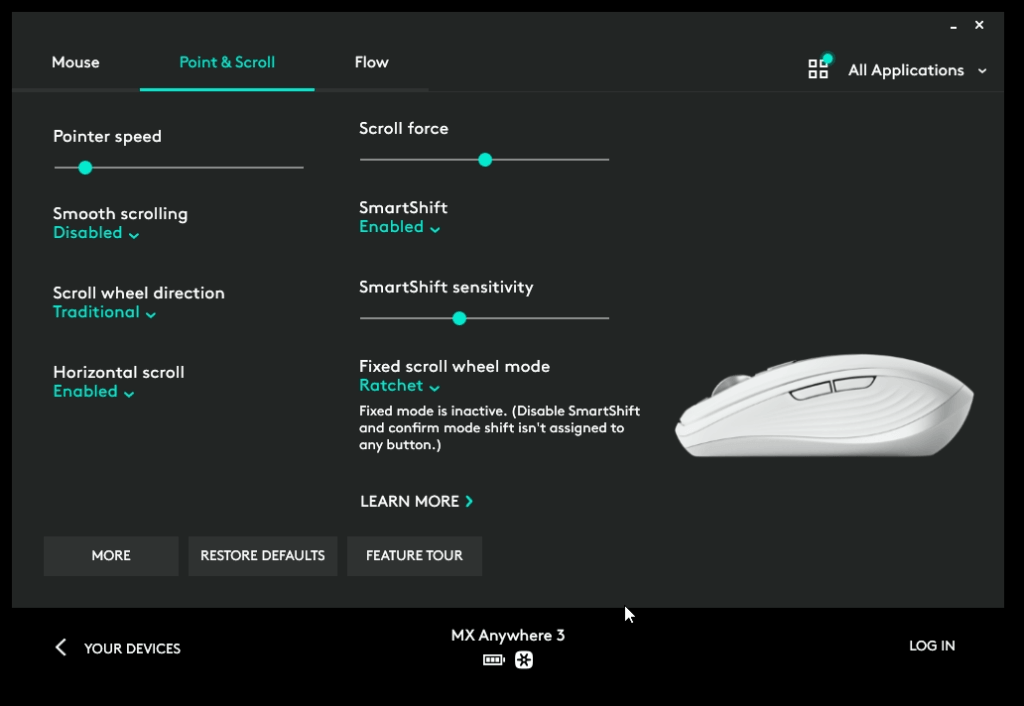
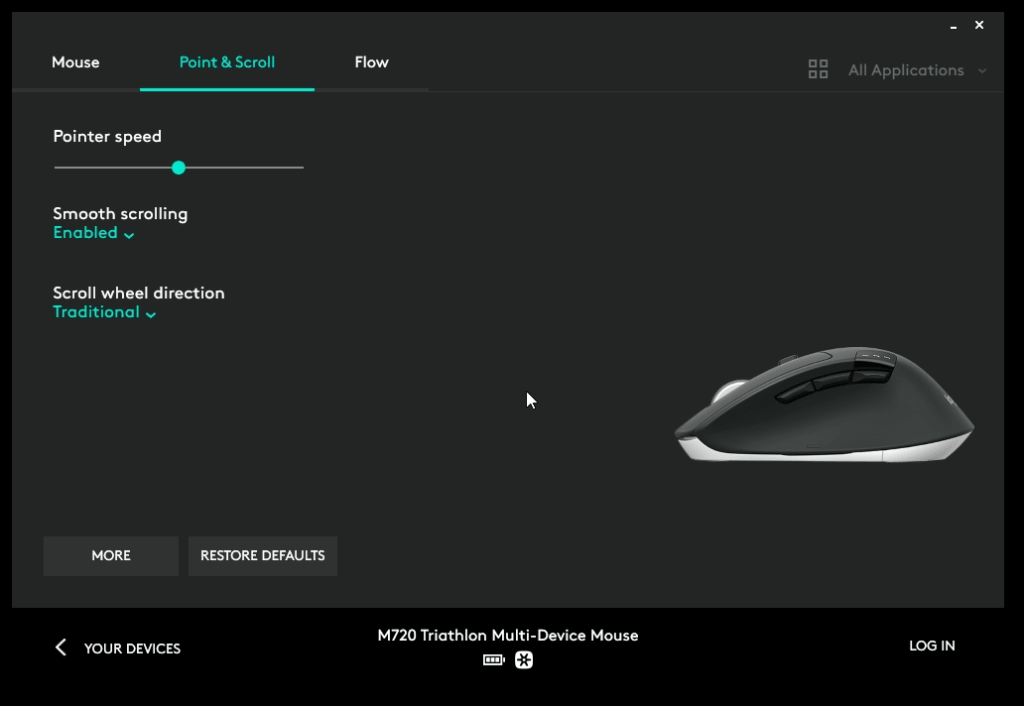
You might need some getting used to switching between the racheted mode and free-spinning mode. The SmartShift function is meant to resolve this issue, which enables you to scroll slowly and fast without pressing the switch, but this feature is only available on higher-end models such as the MX Anywhere 3 and above. The cheaper mice that incorporate infinite scrolling use a simpler mechanical design that lacks the electromagnetic system that can automatically switch between clicky and smooth scrolling.
Below are screenshots of the Logitech Options software program that lets you configure your mice. Evidently, when configuring cheaper mice such as the M720 triathlon, there’s no SmartShift option.
Summary
There are basically three camps out there – the ones that love infinite wheels, the ones who don’t, and the ones who don’t need one. It’s like having side buttons on a mouse – some don’t need them. At the end of the day, it really comes down to personal preference and how each person uses their mouse on a daily basis.
For some users, infinite scrolling is a huge productivity boost. It lets them move through long pages effortlessly and feels almost second nature once they get used to it. But for others, the same feature can feel unnecessary or even frustrating, especially when precision matters more than speed. What works well in one scenario might not work as well in another.
Every technology comes with its own set of trade-offs, and infinite scroll wheels are no exception. They solve certain problems while introducing new ones. And that’s perfectly normal. Technology isn’t perfect because humans aren’t perfect (paraphrasing my good friend). There’s always room for improvement, and that constant push to make things better is what keeps innovation going.